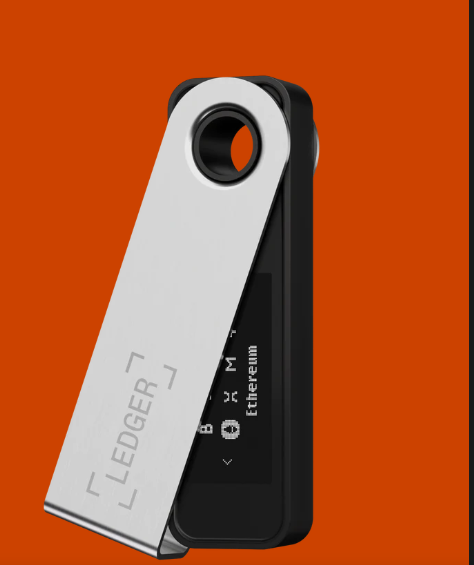
. Best Crypto Wallet: Trezor Model T

Taking the top spot on our podium for the best crypto wallets is the Trezor Model T, the flagship product on offer from the guys over at Trezor. The Trezor brand is a creation of Prague-based company Satoshi Labs (Trezor means ‘vault’ in Czech) and the first device was launched back in 2013.
This top of the line hardware wallet comes in at $280 and supports over 1,000 crypto assets. Trezor has been audited by third-party security researchers and boasts a long-standing successful track record. Since the release, there have been no known instances of successful remote hacks resulting in loss of user funds to date. Trezor is widely considered the safest crypto wallet on the market.
Trezor can be used with the online Trezor web wallet on desktop or mobile, or via the downloaded Trezor suite app on desktop.
Trezor Suite Desktop Wallet App Image via Trezor Wiki
Trezor can also be integrated with web 3.0 wallets such as Metamask and has also formed a unique partnership and integration with the massively popular software wallet Exodus, combining the convenient features and the user interface of the Exodus software wallet with the security of the Trezor hardware wallet. You can read more about that in our Exodus Wallet review.
Trezor offers two hardware wallets, the less robust and cheaper Trezor one and of course the flagship Model T. One of the most obvious benefits of the Model T over the Model One is that you have more coin support, and sensitive information such as the pin code and recovery phrases are entered directly on the Model T’s touch screen keeping all sensitive information off the computer, unlike the Trezor One.
A full list of coins supported by both the Trezor one and Trezor Model T can be found on the Trezor Asset Support page.
- Price: $280 (€249)
- Coins supported: 1,000+ Full list
Another great benefit of the Trezor Model T over the model one device is that it has that user-friendly colour touch screen. I found this to be way more efficient than having to shuffle with the buttons on both the Model One device as well as the ledgers. Trezor is compatible with the major computer operating systems: Windows, Mac, Linux, and works with Android for mobile. Apple’s IOS and Windows mobile operating systems, as well as the Chrome OS are not yet supported.
Setting up the Model T is also pretty quick and very user friendly. All you will need to do is install the bridge and ensure that the firmware is up to date and that should be it. While the Model T is the premium device offered by Trezor, many users do not feel that it is worth more than double the price of the Trezor One.
While both are fantastic options for crypto storage offering top-level security, if you don’t need the additional asset support and don’t mind not having a touchscreen, then picking up the Trezor one for $65 is a cheaper and sure-fire way to ensure your funds are safe.
We have an article where we break down the two Trezor wallets to help you decide which Trezor is right for you.
2. Ledger Nano X

The number two spot on our podium goes to Ledger’s Nano X. For those that don’t know, Ledger is a company that is based in France and they are considered the standard in the hardware wallet market. The Ledger Nano X is the premier product in the Ledger stable and is more expensive than the entry-level Nano S.
The Nano X stores over 1,800 different cryptocurrencies and comes equipped with industry-leading security, including a CC EAL5+ Certified secured chip. The ledger device can connect with a desktop computer through a USB cable, as well as desktop or mobile via a Bluetooth connection. Ledger can run on Windows, Mac, Linux, IOS and
Although most of the crypto can be managed through the use of the Ledger Live software, there are many assets that have native wallets not supported with the software yet. However, given the popularity of the Ledger hardware devices, many of them have integrated with Ledger in order to allow users to securely store their keys.
While the Nano X is more expensive, it has everything that the Nano S has, while also coming with Bluetooth connectivity, a slightly larger screen and the ability to store 100 apps, as opposed to the three to six apps available on the Nano S which has been reported as a major pain point for many users as they feel there is not enough space to install enough apps to support multiple different networks leaving users unable to hold all their favourite coins.
Both Ledger Nanos also support integration with web 3 wallets such as Metamask, allowing users to access various DeFi platforms.
- Price: $119
- Coins supported: 1,800+ Full list can be found on the Ledger Coin Support page.
For crypto users without the need for 100 apps, or the need to store multiple different Altcoins, the Ledger Nano S may be a better solution for a price that is easier on the bank account ($59/£43/€50). There’s not much separating the two Ledger devices and most people would probably be more than happy with the cheaper Nano S. However, for all-around features and the ability to store a whole host of different assets, the Nano X deservedly takes one of the top spots.
It is important to let you know that Ledger did suffer a data breach in mid-2020 resulting in 272,000 customers’ home addresses, telephone numbers, names and about one million email addresses being stolen by hackers. While the crypto-assets themselves were not at risk, this breach did lead to fake emails being sent out by hackers pretending to be Ledger staff asking for users’ private keys and recovery phrases.
This data breach and lack of due diligence being done on behalf of the Ledger team has left a lot of customers to lose confidence in the security and reputation of the Ledger product and the company. If you want more information regarding the Ledger hack, Guy made a dedicated video on the Ledger hack, and more information about the breach can be found in the Ledger Blog.
Be sure to check out our dedicated article on the Ledger Nano X Review if you feel this may be the one for you.

3. KeepKey

Coming in third on our list is the KeepKey hardware wallet. You can’t fault KeepKey on price, as for less than $50 you’d struggle to find a better hardware wallet. It’s also beautifully designed and has a rugged metal case and a bigger screen than any of its rivals.
KeepKey was bought by Shapeshift back in 2017, so the wallet has full integration with the Shapeshift platform and its exchange which can be accessed directly from the KeepKey wallet. Keepkey only has the option of generating a 12-word recovery phrase, and users manage their funds via the Shapeshift Platform when the device is plugged into a computer via USB.
KeepKey’s security was compromised when rivals Ledger found a way to extract pin codes from the wallet, although this required having physical possession of it. The glitch was later fixed in an update.
- Price: $49
- Coins supported: Around 40+. Full list can be found on the Keepkey Supported Assets page.
The main drawback with KeepKey is its relative paucity of coin support in relation to the other wallets on this list. The Keepkey wallet also lacks integration to many web 3 wallets such as Metamask leaving users unable to interact with many DeFi apps.
Keepkey natively supports Bitcoin, Bitcoin Cash, Bitcoin Gold, Dash, Dogecoin, Ethereum, Kyber Network, Litecoin and DigiByte and can be paired with MyEtherWallet to allow support for any ERC-20 token. This is still a pretty limited list in comparison to its rivals and could well prove unsuited to anyone holding a particularly diverse portfolio.
4. KEYSTONE
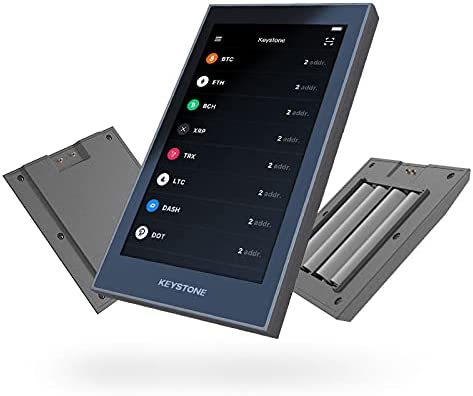
WHY KEYSTONE
THE MOST POWERFUL HARDWARE WALLET
Easy to Use and Compatible with Top Software Wallets
Keystone is compatible with top wallets like 🦊 MetaMask, 🦉 Core, Keplr, ArConnect, Solflare, Petra Wallet, Sender Wallet, XRP Toolkit and many others. Our goal is to bring forth a seamless user experience for everyone.
SIMPLE TO USE
MOBILE-LIKE EXPERIENCE
4-Inch Touchscreen
Fingerprint Sensor
Stop Losing Your Funds to Human Error
Human error is reportedly the biggest reason why many users lose their funds. At least 4 million Bitcoins were lost due to transaction errors.
Keystone safeguards you by delivering a close-to-mobile user experience via a 4-inch touchscreen, allowing you to triple check your transaction before approving it with our in-built fingerprint sensor.
Our Hardware Design
CONVENIENT TO USE
FULLY OFFLINE DEVICE
Air-Gapped
Portable
Transaction Signing via QR Code
Conduct QR code signing anytime, anywhere
No requirement for a data cable; transaction signing can be done directly via QR code using a mobile phone or computer.
Supports verification of QR code details to prevent malicious codes from penetrating the device.
Our Security Schemes
EXTENSIVE COMPATIBILITY
COMPATIBLE WITH ETH, BSC & VARIOUS EVM CHAINS
ethbscavaxpolygon567
MetaMask’s Official Hardware Wallet Partner
Keystone is the ONLY hardware wallet that’s integrated with both the MetaMask’s Web Extension and Mobile App.
Through this integration, our users will be able to access various EVM chains like Polygon, Avalanche etc. as well as the tokens and DApps launched on them.
How It Works
Keystone’s Web3 Compatibility
ONE-STOP SHOP FOR ALL YOUR CRYPTOCURRENCY NEEDS
CONFIGURE YOUR DEVICE TO HOLD BTC ONLY OR ALT COINS
Open Source
Keystone has pioneered the industry’s first Open Source code for hardware wallets.
It allows everyone to analyze how private keys are derived from physically generated entropy (TRNG) and remain entirely confined within the Secure Element.
Detachable + AAA Battery
Rechargeable lithium battery and a AAA battery holder
KEYSTONE TABLET
Manufactured with 304-grade stainless steel. The Keystone Tablet will be able to securely store and protect your recovery phrase over a long period of time. Compatible with any software or hardware wallet.
Hardware wallets used to be slow and clunky, but The Keystone Pro has been a pleasure to use. The touchscreen, built-in camera, and fingerprint sensor make it one of the easiest and fastest wallets out there.
If you’re looking for an affordable and user-friendly wallet, the Keystone Pro is my top pick! It’s arguably one of the most secure hardware wallets on the market. It’s 100% air gapped, has an anti-tamper mechanism, and supports Shamir backup. This thing is basically a vault for you digital assets.
All in all, the wallet is quite a nice device that ensures high-grade security for personal use.
Keystone has an extra layer of protection that just eases users mind. The ability to read decoded transactions on Keystone is a huge plus point.
When you travel, you ONLY carry a Keystone Hardware Wallet. This is because it allows to perform DeFi transactions from my mobile device. Trezor or Ledger requires to connect a laptop to a wifi or hotspot connection.
Ever wanted to Sweep and List NFTs or Swap on the go?
Thanks to @KeystoneWallet now you can.
AirGapped QR Based Wallet (No BT/WiFi) that is the only of his kind supported by Metamask.
If you are active in DeFi/Crypto, Keystone is a great tool.
It could easily be the best investment you ever make in cryptocurrency.
Hardware wallets used to be slow and clunky, but The Keystone Pro has been a pleasure to use. The touchscreen, built-in camera, and fingerprint sensor make it one of the easiest and fastest wallets out there.
If you’re looking for an affordable and user-friendly wallet, the Keystone Pro is my top pick! It’s arguably one of the most secure hardware wallets on the market. It’s 100% air gapped, has an anti-tamper mechanism, and supports Shamir backup. This thing is basically a vault for you digital assets.
It’s my go to wallet. It’s air gapped using a built-in camera and QR codes, so no connection to your computer or phone! NFTs can also be set as your lock screen!
All in all, the wallet is quite a nice device that ensures high-grade security for personal use.
Keep Your Crypto Assets Secured with Keystone!
NANO S PLUS
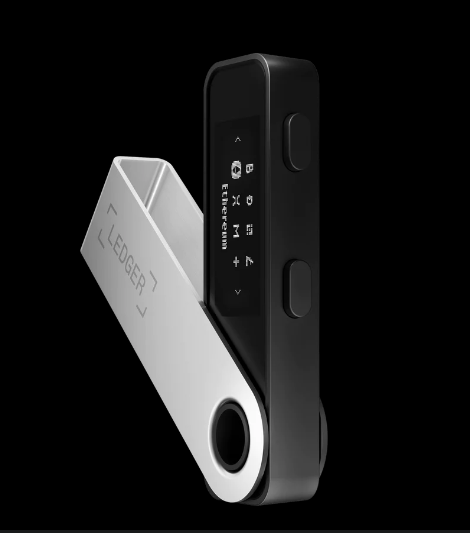
LEDGER NANO S PLUS
NANO S PLUS costs 100-$114. It will secure your assets and will help explore Web3. Take the iconic Ledger Nano S, then make it DeFi and NFT-friendly. That’s what Ledger did with the new Nano S Plus.
Manage over 5,500 digital assets
More memory lets you have up to 100 apps installed simultaneously
Supported crypto assets
Manage your NFTs safely
Send and sign your NFT transactions with full transparency in Ledger Live: what you see is what you sign.Enjoy a smoother user experience
The large screen makes it easy to navigate and verify transactions
Safeguard your crypto, NFTs, and tokens
The certified secure chip keeps your private keys offline, out of hackers’ reach.
What’s the difference between Ledger Nano S Plus and Ledger Nano X?
Besides many similarities, there are also notable differences between the two wallets. Ledger Nano S Plus has no Bluetooth functionality for users that require more secure environment.